Draw Backflip
- 3.2
- Rating
- 1.00M
- Installs
- Free
- Price
 Analysis by App-foxy
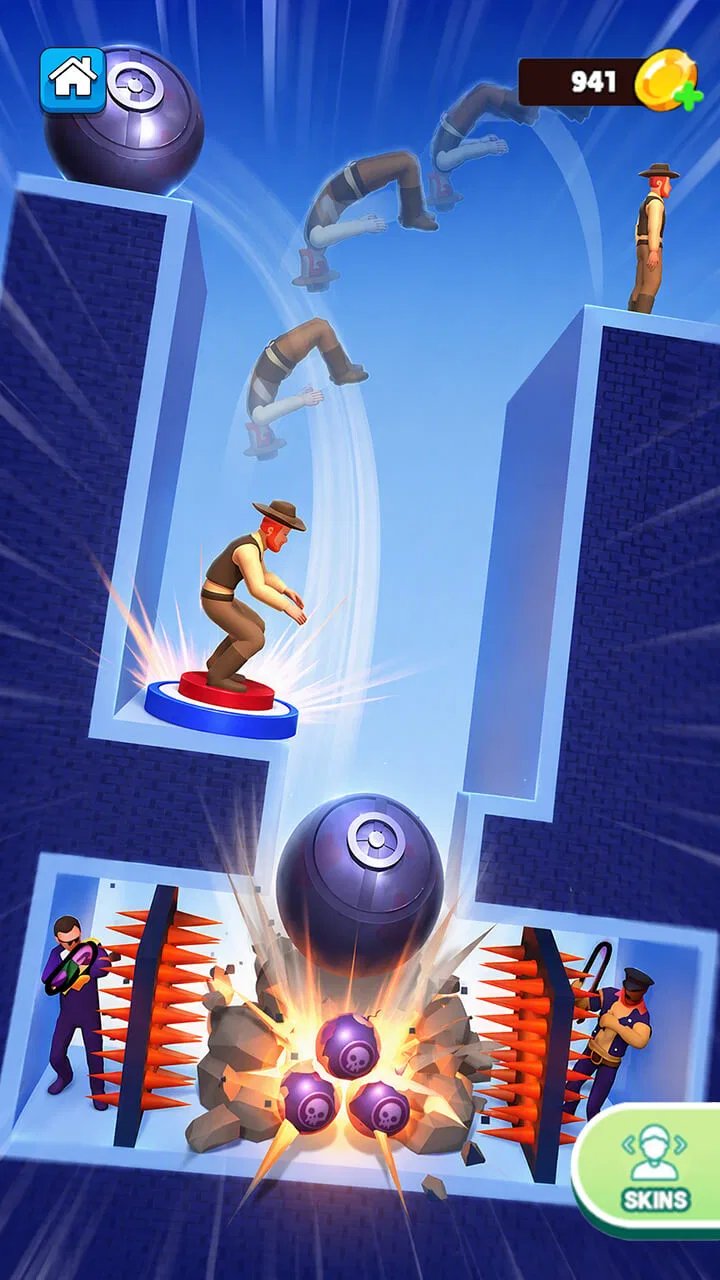
I found Draw Backflip most interesting as a quick, gesture-based casual game rather than something I would sit down with for a long, structured session. Its entire appeal is easy to understand: you draw a path, try to guide a character through a backflip, and repeat the attempt when the result is not quite right. That simple idea makes it approachable, but it also means the quality of each attempt depends heavily on how clearly the game communicates timing, movement and failure.
In my experience, this is the kind of game that works best when I want a few minutes of playful concentration. It does not ask me to learn a large rule set before starting, and the central drawing action feels more direct than the button-heavy controls used by many casual games. At the same time, its simplicity can become a limitation for players who want deeper progression, a calmer pace or more detailed guidance.
How the game feels to read and navigate
The most important interface decision here is the drawing interaction. Instead of relying on several on-screen buttons, the game puts attention on the path I create. That gives the experience a clean starting point: I can understand the basic goal quickly, even if producing a successful flip takes practice. For a player who prefers visual interaction over memorizing controls, that is a useful advantage.
You May Also Like

 Blood Strike: 2.5 Anniversary
Blood Strike’s Loadouts Turn Every Drop Into a Tactical Gamble
A close look at Blood Strike’s custom loadouts: how fast access to signature weapons reshapes its battle royale rhythm, rewards preparation, and narrows the gap between fights.

 Pandora - Music & Podcasts
Pandora’s Music Is Easy to Start, but Harder to Recover
Pandora’s strength is its low-effort path from a seed to a station. Its weak spot is how much confidence it asks you to place in connection, setup, and quiet recovery.

 8 Ball Pool
 Is Built on Rivalries, Rematches, and Routine
A close look at the rivalries, rematches, shared routines, and unanswered safety questions that turn a quick pool match into a persistent mobile community.

 Samsung Music
’s Quiet Strength Is Playing What You Already Own
Its reach comes less from spectacle than from dependable access to a personal library. That simplicity is both the app’s strongest retention engine and its ceiling.

 AccuWeather: Weather Radar
AccuWeather Review: A Quick, Clear Forecast for Everyday Decisions
For everyday plans, the best forecast is the one you can understand quickly. AccuWeather makes rain timing, radar, and local conditions easy to act on, with a few trade-offs.

 Hill Climb Racing
Why Hill Climb Racing Still Turns Crashes Into One More Run
A tiny car, a bumpy hill and one more upgrade: Hill Climb Racing keeps resurfacing because its simple chaos makes every near-miss feel personal.
More From Our News Desk
View All News


The short description, “Draw Backflip,” sets a very narrow expectation, and the game stays centered on that idea. I do not have to decode a complicated inventory, character sheet or menu system before playing. This makes it suitable for short breaks, especially when I am using a phone one-handed and want to begin without a lengthy setup.
There is a difference, though, between a game being easy to start and being easy to understand perfectly. A first attempt may show what to do without fully explaining why one drawing succeeds while another fails. When the movement is sensitive to the shape or timing of the gesture, I have to learn through repetition. That trial-and-error loop can be entertaining, but it may feel unclear to anyone who expects explicit instructions.
I also think the visual readability matters more here than it would in a typical tap-to-jump game. The drawn route needs to stand out from the play area, and the character’s movement needs to be easy to follow while the action is happening. Players with reduced visual sharpness, difficulty distinguishing nearby colors or sensitivity to busy motion may need to adjust their expectations. The game’s core action is visual, so missing a small change in the scene can affect the result.
My practical advice is to begin with deliberate, uncomplicated gestures rather than trying to draw elaborate paths immediately. A shorter movement is easier to repeat consistently, and consistency is more useful than making a dramatic shape that works only by accident. This is one of the less obvious lessons of the game: improving often comes from making the input more controlled, not more complicated.
Learning the drawing language
Players who enjoy experimenting will probably appreciate the way the game turns a familiar physical action into a puzzle. I can test a line, observe the flip, and alter the next attempt. That makes the learning process feel personal because I am not simply selecting a preset move. I am building the movement myself, even within the limits of the level or challenge.
However, this design asks for patience. If the game does not immediately make the cause of a failed attempt obvious, I may need several tries to separate a poor drawing from poor timing or an unsuitable approach. That can be frustrating for someone who prefers predictable controls. A conventional platform game with fixed buttons would usually provide clearer cause and effect, while this game gives me more freedom but less certainty.
The developer is Deli ventures, and the game sits firmly in the casual category. That positioning makes sense: its main attraction is an instantly recognizable action that can be repeated without a long commitment. The current version is 2.1.3, so players should use the normal update process on their device to keep the installed build current rather than relying on an old copy.
Motor demands behind a simple gesture
Drawing on a touchscreen may sound easier than coordinating several buttons, but it is not automatically accessible to every player. The gesture requires a degree of hand control, and the result can change when a finger slips, starts from the wrong place or moves at an uneven speed. I found that the game rewards a stable grip and a consistent starting position, especially when I am trying to repeat a successful attempt.
That creates an important trade-off. Someone with limited fine-motor control may find one continuous gesture more manageable than rapid tapping, but another player may find the same gesture difficult because it cannot be divided into smaller actions. The game is therefore potentially comfortable for some motor preferences and demanding for others. I would not describe it as universally easy simply because the control scheme looks minimal.
A useful everyday approach is to play with the phone resting on a table instead of holding it in the air. This reduces unnecessary movement and makes the drawing hand more stable. It also helps when I want to compare two attempts, because the screen remains in a similar position. That small change can make the experience feel less dependent on accidental finger movement.
Players who use a stylus may also wonder whether it would help. In principle, a stylus can offer more precise contact for people who prefer pen-like control, but it may not be convenient for a quick session and the game’s basic appeal is built around direct touchscreen drawing. I would treat a stylus as a personal experiment rather than an essential accessory.
Sensory comfort during short sessions
The action is designed around movement, so players who are sensitive to animation may want to approach it in brief sessions. Repeated flips and failed attempts can create a busy visual rhythm, particularly when I am concentrating on the line and then immediately watching the result. I would avoid playing when already tired or motion-sensitive, because a game that feels amusing for two minutes can become uncomfortable if I keep repeating the same visual sequence.
Sound can also affect whether the experience feels comfortable, although my main judgement of the game comes from the drawing and animation rather than audio. If I am playing in a quiet place, on public transport or beside someone who is sleeping, I prefer to check the device’s sound before starting. A silent or low-volume setting is generally the more considerate choice for a game intended for short, spontaneous play.
There is a useful sensory advantage in the game’s narrow focus: I am not asked to monitor a large amount of text, several meters or a crowded interface while drawing. That can make it less mentally cluttered than many free casual games. The drawback is that the central visual action carries almost all of the information, so players who cannot comfortably follow it may have fewer alternative ways to interpret what is happening.
Where it fits into real situations
I can imagine playing this while waiting for an appointment, taking a short break from work or relaxing after finishing a task. The free price removes the need to make a purchase decision before trying it, and its casual structure suits people who want an activity that can be picked up quickly. With over a million installs, it has clearly reached a broad mobile audience, although popularity alone does not guarantee that its gesture-based design will suit every player.
A realistic example is a ten-minute wait at a café. I could open the game, make several attempts, learn how the drawing affects the flip and stop without needing to remember a complicated storyline. That is where the game feels strongest: it turns a small amount of spare time into a focused challenge. I would not choose it for a long journey if I wanted a rich progression system or a narrative to carry me through the entire trip.
The age rating is Teen, so I would not automatically treat it as a game for very young children. A child may understand the drawing concept, but the rating is a reminder that parents should check whether the overall presentation suits their family before handing over the device. The game’s simple control does not by itself determine its appropriate audience.
It requires Android 8.0 or later, which is relevant for anyone using an older phone or keeping an older device as a spare. On a compatible phone, the main question is less about hardware power and more about screen comfort, touch accuracy and whether the player enjoys repeated physical experimentation. Someone with a small screen may find the drawing area less forgiving than someone using a larger display.
For shared devices, I would be cautious about assuming that every player will enjoy the same control. One person may like drawing directly on the screen, while another may prefer a game with visible buttons that provide a stronger sense of control. If several people are trying it, I would let each person make a few attempts before judging the game. The first failed gesture can say more about unfamiliarity than about the player’s actual ability.
Comparing it with familiar casual alternatives
Compared with endless runners, this game gives me more influence over the movement but less of the automatic flow that makes runners relaxing. In an endless runner, I usually react to obstacles with taps or swipes and gradually improve my reflexes. Here, I am shaping the movement itself, so the challenge is closer to drawing a workable solution than simply reacting at the right instant.
Compared with physics puzzle games, it has a more immediate physical idea. I do not need to arrange several objects or plan a long chain of events before seeing the result. The benefit is speed; the cost is that the experience may feel narrower once the novelty of drawing a backflip wears off. Players who enjoy experimenting with many puzzle systems may prefer a broader physics title.
Compared with button-based stunt games, the gesture creates a more personal connection between my hand and the character’s action. That is the game’s clearest identity. It also creates its biggest weakness: a button gives a repeatable command, while a drawn line can vary slightly every time. If I want precision that feels mechanical and dependable, a traditional control scheme may be a better fit.
The game is also different from idle casual titles, where progress can continue with very little input. Draw Backflip expects active participation during each attempt. That makes it more engaging when I want to focus, but less suitable when I am looking for something to leave running in the background.
Barriers that remain after the easy start
The main barrier is not learning the objective; it is understanding the relationship between the gesture and the result. A player who needs clear feedback after every attempt may find the learning curve more irritating than entertaining. I would have preferred the game to make the reason for a failed flip especially obvious, because that would help players with different learning styles and reduce unnecessary repetition.
Another barrier is the dependence on direct touchscreen input. Players with tremors, joint pain or difficulty maintaining a smooth line may need to adapt their grip, use a stable surface or take frequent breaks. Those adjustments can help, but they do not remove the underlying requirement for a controlled gesture. The game’s simplicity should not be confused with low physical demand.
Visual and motion sensitivity are additional considerations. The central action is animated and repeated, and the player must watch the result to improve. Anyone who finds rapid movement uncomfortable should keep sessions short and stop if the screen becomes tiring. I would choose a slower, menu-driven puzzle game instead when visual calm is a priority.
The average rating is 3.2 from around 442 ratings, with 18 written reviews. I read that as a sign to keep expectations measured rather than assuming the game will work equally well for everyone. The concept is clear and distinctive, but the same control idea that attracts one player can frustrate another. Its free price makes trying it low-risk, yet time and comfort are still reasons to decide carefully.
Who should try it, and who should skip it
I recommend trying it if you like short experiments, physics-flavored movement and games where your own gesture affects the outcome. It is especially appealing when you enjoy repeating a small challenge to refine technique rather than chasing a large collection of features. The best audience is someone who sees failed attempts as information and does not mind a little uncertainty while learning.
I would skip it if you want a calm game with little animation, a detailed story, dependable button controls or a substantial long-term progression system. I would also be cautious if touchscreen drawing is uncomfortable for you or if repeated motion quickly causes visual fatigue. In those cases, a conventional casual puzzle or a slower turn-based game is likely to be more accommodating.
For players with different abilities, I would judge it through a short personal test: can you hold the device comfortably, make a controlled gesture without pain, and understand what changed between two attempts? If the answer is yes, the game may offer a pleasantly direct challenge. If not, the problem is not a lack of effort; the control design may simply be a poor match.
My inclusive verdict
Draw Backflip has a focused idea and a control method that gives it more personality than a generic tap game. I like that I can start quickly, experiment with my own movement and use it during small gaps in the day. The free entry point makes that experimentation easy, while the Teen rating and Android 8.0 requirement are practical details to consider before installing it.
Its accessibility is mixed in a very specific way. The uncluttered concept may help players who prefer a single visual task, but the same reliance on drawing, touch accuracy and animated feedback can exclude people who need alternative controls, slower motion or stronger explanations. I would describe it as approachable, not universally accessible.
The best reason to play is the direct connection between your finger and the flip. The best reason to move on is that this connection can become imprecise or tiring when you need consistency, visual calm or more control options. I would recommend giving it a brief, low-pressure test on a comfortable surface. If the drawing feels satisfying after a few attempts, it can be a fun little time-filler; if it feels mysterious or physically awkward, another casual game will probably serve you better.
FAQs for Draw Backflip
01What is the main objective of Draw Backflip?
Draw Backflip is a physics-based puzzle game where players must guide a character to perform successful backflips. The main challenge is to draw safe landing paths using your finger to ensure the character lands perfectly. The game combines creativity and strategy, requiring players to consider angles, speed, and trajectory for each jump.
02Is Draw Backflip suitable for all ages?
Yes, Draw Backflip is designed to be family-friendly and suitable for all ages. Its intuitive controls and simple mechanics make it accessible for younger players, while its challenging levels provide enough depth to keep older players engaged. However, parental guidance is suggested for very young children to assist with in-game purchases.
03Does Draw Backflip require an internet connection to play?
Draw Backflip can be played offline, making it perfect for on-the-go gaming without using mobile data. However, certain features like leaderboards, updates, and in-game purchases might require an internet connection. It's recommended to occasionally connect to access these features and ensure the app is up-to-date.
04Are there in-app purchases in Draw Backflip?
Yes, Draw Backflip offers in-app purchases that allow players to buy additional levels, characters, or cosmetic items. While the game is free to download and play, these optional purchases can enhance the gaming experience. Always ensure that in-app purchases are managed, especially if children are playing the game.
05How can I improve my skills in Draw Backflip?
Improving in Draw Backflip involves practice and experimentation. Start by mastering the basic mechanics and understanding the physics of each jump. Experiment with different drawing strategies to find the most efficient paths. Watching replays of your attempts can also help identify areas for improvement, allowing you to refine your approach.
Pros
- Intuitive controls for smooth gameplay.
- Variety of levels with increasing difficulty.
- Engaging graphics and sound effects.
- Offline mode available for on-the-go play.
- Regular updates with new features.
Cons
- Contains ads that can interrupt gameplay.
- In-app purchases required for some features.
- Limited character customization options.
- Can be repetitive after extended play.
- Initial loading time can be slow.

Draw Backflip
Gallery